How MowReview makes money: As an Amazon Associate, MowReview earns from qualifying purchases, at no extra cost to you. We don’t test mowers ourselves; we explain what manufacturers and independent testers report. How we research
Quick answer
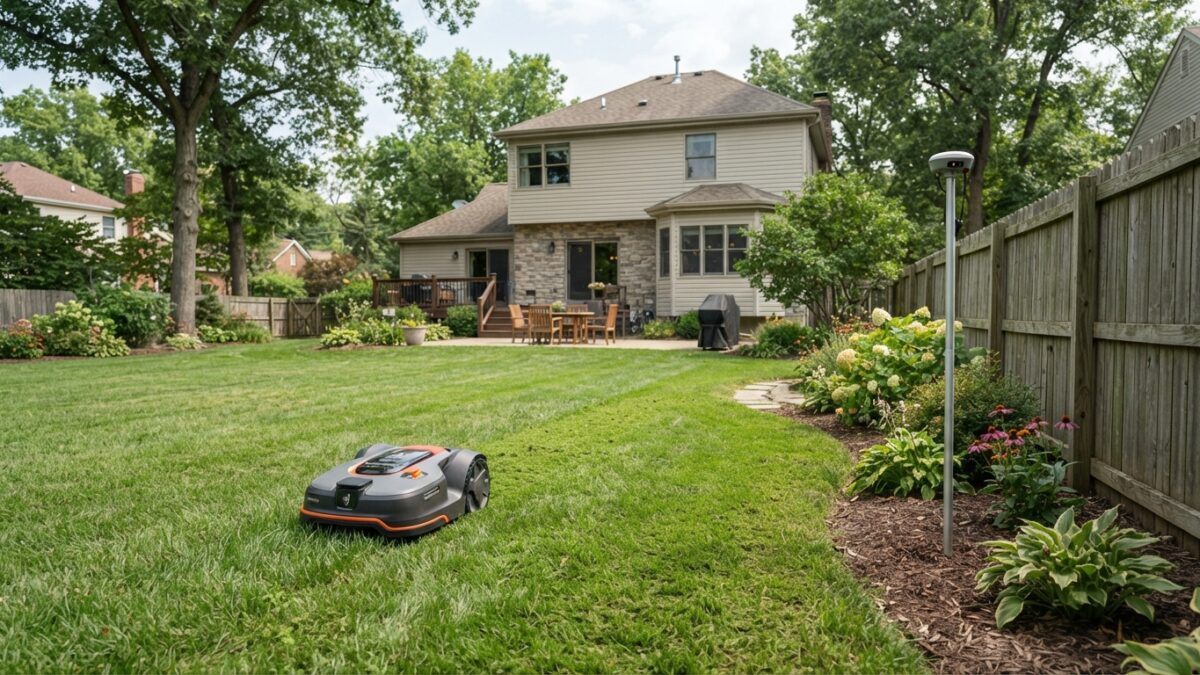
The base station is a small antenna that sits in a fixed spot in your yard and corrects the satellite signal so the mower knows exactly where it is. Many mowers still need one, and its placement matters more than almost any other setup decision. Some newer models use network RTK instead, taking the correction over the internet, so there’s no antenna at all. LiDAR mowers don’t use satellites and need nothing.
If you’re looking at wire-free mowers, you’ll keep meeting a second box in the photos: a small pole or dish separate from the charging station. Here’s what it does and whether you need one.
What the base station actually does
Plain satellite positioning is accurate to several meters, which is nowhere near enough to follow the edge of a flower bed. RTK fixes that with a second receiver in a known fixed position, your base station or reference antenna.
Because it knows its own exact coordinates, it can measure the errors the satellite signals pick up on the way down through the atmosphere, and pass the correction to the mower. Ecovacs puts the resulting accuracy at centimeter level, roughly two centimeters. That’s precise enough to draw and follow a virtual boundary.
It has one job, and it does nothing else. It doesn’t cut, charge or control anything.
Where to put it
This is the decision that makes or breaks a wire-free setup, and it’s worth taking seriously:
- The most open sky you have. Ecovacs explains that leaves, branches and trunks reduce the usable signal, so away from tree canopy is the priority.
- High. Most mowers come with a pole or a wall bracket. Higher usually means a clearer view.
- Clear of rooflines, and away from large metal and glass surfaces, which cause problems through reflected signals.
- Within reach of what it needs. Check your manual for whether yours needs mains power, and how far it can sit from the charging station.
- Somewhere it can stay put. Move it later and your map may no longer line up.
Photograph and mark the spot
If you ever take the antenna indoors for winter, it has to go back in exactly the same position. Husqvarna says its EPOS reference station is weatherproof and can stay outside all year, and that leaving the mounting arm in place preserves your virtual boundaries as long as it returns to precisely the same position. Mammotion’s guidance is to bring navigation units in and reinstall them in their original spots.
Our setup guide covers the order to do all of this in.
The three setups you’ll meet
| Setup | Antenna in your yard? | Depends on | Suits |
|---|---|---|---|
| Local RTK base station | Yes | Clear sky above the antenna and the lawn | Open lawns; no network needed for positioning |
| Network RTK | No | A cellular or internet connection | Yards with nowhere good to site an antenna |
| LiDAR or camera navigation | No | Nothing from satellites at all | Shaded yards and enclosed lots |
Network RTK: skipping the antenna
Instead of an antenna in your yard, some mowers take the correction over a cellular or internet connection from reference stations elsewhere. Mammotion’s LUBA 3 is one that no longer needs a separate RTK station, and Segway’s X4 series uses network RTK too.
The advantages are obvious: nothing to site, nothing to mount, nothing to bring in for winter. The trade-off is that you’ve swapped one dependency for another. Segway notes performance may be limited where the network signal is weak, so if parts of your property have poor reception, check with the manufacturer before assuming it will work.
It’s also worth asking whether the connection carries a fee after any included period. TechRadar notes Mammotion includes three years of free cellular data with the LUBA 3, which tells you there’s a charge at the other end of it.
When you don’t need any of this
Two kinds of mower sidestep the whole question:
- LiDAR mowers. PCWorld describes the Ecovacs GOAT A3000’s dual laser sensors as removing the need for a satellite antenna entirely. For a shaded yard, that’s the cleanest answer.
- Boundary-wire mowers. A physical wire needs no satellites at all. See wire vs. wire-free.
If your yard has nowhere good for an antenna
Some properties genuinely don’t: a small lot surrounded by mature trees, or a house that shades the only open ground. In that case, don’t fight it. Look at a LiDAR mower, a network RTK model if your reception is good, or a boundary wire. Buying an RTK mower for a yard with no sky view is the most common expensive mistake in this category.
Our guide to mowers for yards with lots of trees covers the alternatives.
Questions
Where should I put the RTK base station?
In the most open spot you have, mounted high and clear of tree canopy, rooflines and large metal or glass surfaces. Obstructions reduce the usable satellite signal and reflections cause errors. Check the manual for the maximum distance from the mowing area, and mark the exact position in case you ever move it.
Does the base station need Wi-Fi or power?
It depends on the model. Some are mains-powered, some are not, and network RTK models have no yard antenna at all but do rely on a cellular or internet connection instead. Check your manual, since this varies more between brands than almost any other setup detail.
Can I move the base station after setup?
Moving it usually means your existing map no longer lines up, because the boundary was drawn relative to its position. If you must move it, expect to remap. If you take it indoors for winter, return it to precisely the same spot.
Sources
- Ecovacs: LiDAR vs. RTK robot lawn mowers (how RTK correction works, obstructions, multipath)
- PCWorld: Ecovacs GOAT A3000 review (LiDAR removes the antenna)
- TechRadar: Mammotion LUBA 3 AWD 3000 review (no separate RTK station, included cellular data)
- Amazon listing: Segway Navimow X430 (network RTK, signal limits)
- Husqvarna: Automower support (EPOS reference station placement and winter)
- Mammotion: Winter storage (reinstalling navigation units in original positions)
Not sure which navigation suits your yard?
Satellite, laser and camera systems each behave differently once there are trees and buildings involved.